If you are a Developer working on Magento, especially for Magento 2, one small recurring headache would probably be the Magento Reindexing requirement.
Yes, ‘Reindexing‘ .. that cruel word which requires you to go to Command Line Interface on a terminal such as Putty and write in some stuff, then empty the cache etc. Starting from Magento 2, you cannot do Reindexing through the Admin Panel (unless of-course you install some extension , which may well be bloated).
Essentially for Magento 2, such as Magento 2.1, 2.2, there are two most common method for Re-indexing. But before we come to that, let’s look at why and when we need to reindex.
For example, if you change the price of your product – say from $29.99 to $24.99 or if you add new products, Magento would need to reindex to display this data to the user browsing your store.
Without indexing, Magento would have to calculate the price of every product on the fly—taking into account shopping cart price rules, bundle pricing, discounts, tier pricing, and so on. Similarly for products within subcategories or inventory calculations. Imagine this happening on a store with hundreds and thousands of products on each page load. Indexing allows Magento to store this data in quick loading way with most of the calculations already built in.
So, lets talk about how you can do Reindexing in Magento. We will be talking specifically about Magento 2. In Magento 2, there are essentially 2 options for re-indexing:
1. Manual Reindexing from CLI using a Terminal like Putty
Here the steps are:
a) First to download a SSH terminal like Putty
b) Get SSH access
c) Generate private key etc. with help from your host and add it to the local computer.
d) Login to Putty with the passphrase provided by your host and using the correct port and type in the correct commands which are:
Code:php bin/magento indexer:reindex [indexer]
Omit the [indexer] switch to reindex all indexes which is what you will generally do on the smaller to medium sites. Note that this is a manual one time re-index. If your website gets product updates, price changes, inventory changes etc. regularly and maybe multiple times during the day you need to do a CRON JOB REINDEX, which is the 2nd option.
Note: The above command assumes you are in the magento root directory which is most likely the directory in which your magento website is installed.
2) Running a Cron job to Reindex your Magento 2 website
In the Index Management page where your index status are shown, there is a Mode option. This should be set to ‘Update on Schedule’. for Cron.
Now, to run a Cron Job on a shared hosting for magento reindex, you will probably find cpanel having a specific cron section and there in you have the option of adding cron job like shown.
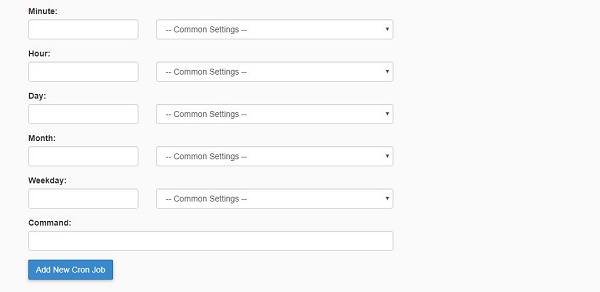
According to the Magento 2 development docs – below are the cron options that one can run. When running a cron job , you will have the option to choose how Often you want to run it and what the command is. Here are the 3 set of commands that typically are used for running cron job. The first one is the one used for managing indexes. The other two are for deploying components and maintaining Magento upgrade. You probably shouldn’t be running the last 2 as cron jobs as these are not the very regular changes to be applied to your Magento 2 site and should be done in managed manual way.
* * * * * 'path to php binary' 'magento install dir'/bin/magento cron:run | grep -v "Ran jobs by schedule" >>
* * * * * 'path to php binary' 'magento install dir'/update/cron.php >>
* * * * * 'path to php binary' 'magento install dir'/bin/magento setup:cron:run >>
Note the following:
a) You need to specify the directory / path to php binary. In case you do not know this; do not hesitate to talk to your Hosting support guys and they will tell this to you immediately. But let’s come to another important issue – the structuring of the command.
b) There are two parts of the command, where the first one runs the command, the second is asking to update the log file with the result.
c) The ‘path to php binary’ and ‘magento install dir’ has to be replaced by the respective paths. This you can find from your host and the magento install directory is typically something like /var/www/html/magento2 . Ofcourse this depends from host to host. Similarly php bin directory is something like /usr/bin/php
There is also a 3rd option and this one is for many of those who are not the biggest fans of using CLI for performing various tasks.
3) Reindex your Magento 2 installation from Admin Panel using Plugins – many of which are Free .
Yes this is a good option as well if you are not comfortable with CLI or running cron jobs. An example of a Free extension to Re-index from Admin panel for Magento 2 is this BSS Commerce Extension. This should be downloaded from the marketplace and installed as per the guideline. Using this extension you will be able to index directly on the Index Management page in your Admin panel of Magento.
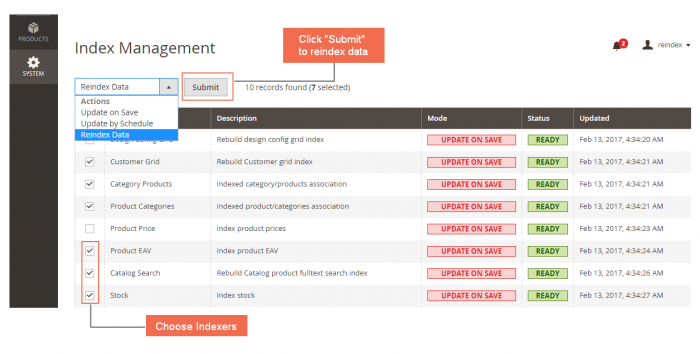
Image Courtesy: BSSCommerce Marketplace Extension
What about Magento 1 Installations?
Note that before Magento 2, you could well reindex easily through your Magento Admin Panel in an ad-hoc manner. But that changed with the new version.
Thankfully, Magento atleast tells us that ‘One or more of your indexes is invalid’even in Magento 2 through the Status column. And ofcourse if you are using Cron job, you can also log the result in log files (in Var/log directory).
One big problem – CLI based Magento Reindexing does not work for Magento 2.2 on Php 7.2 / 7.2+ environments.
Yes, if you are hosted on a server which has Php 7.2 environment which many of the new shared hosting default to – you may be experiencing issue of your CLI based reindex etc. commands not working. Like the figure below:
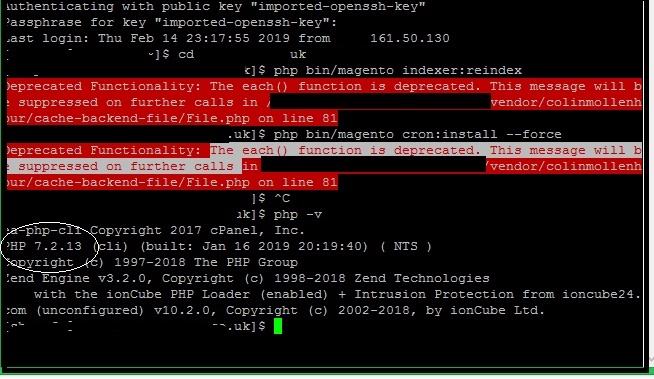
In some cases you can change the php configuration of your server to 7.0 which should make it work but considering it is a shared host you may not be able to. And it is quite possible, the terminal root php environment would not change.
As you can see, we are unable to reindex from the command line and the environment is 7.2 . The dreaded error we get is : The each() function is deprecated. This message will be supressed further… ON Magento 2 , php 7.2. File name : vendor/collinmollenhour/cache-backend-file/File.php
So here is what we suggest as a solution:
A) First try changing the environment to 7.0 from Control panel – assuming you don’t have other sites which require it. Now in terminal , in the specific directory, type php -v . This will show you the current environment after the change. If it is still not 7.0 , then you probably won’t get the right to change this if this is a shared hosting.
So what is the next step. From experience and scouring through the various solutions available on the internet, we came to realize there are basically three solutions.
1. The first is to edit the 2 files (thankfully only 2) which cause the error and change the lines of code as explained here (at the very end). Here we are editing two files both in vendors folder which are deprecated in Php 7.2 and hence cause the issues. This is not a very neat solution and only recommended if the second is not working or you really need ad-hoc reindexing, because modifying files like this is inadvisable even if the changes are merely syntax changes to keep pace.
2. The second and perhaps cleaner is to apply a cron job from your control panel (assuming ofcourse it is allowed) to perform automatic scheduled indexing of your Magento Environment, as discussed in detail earlier. Below is the specific CLI command.
3. The 3rd and easiest if your host allows is to change PHP version (so that it changes for terminal also – not just for the specific directory) from 7.2 to 7.0 . However this may not be possible unless you are on VPS or own server.
* * * * * 'path to php binary' 'magento install dir'/bin/magento cron:run | grep -v "Ran jobs by schedule" >>
Note: The trick here is to opt for Php 7.0 to run this cron job as Php 7.2 or whatever is the root PHP version may not be compatible with the files we spoke about earlier. This can be done as shown below:
/opt/php70/bin/php
where /opt/php70/bin/php is the path to the php 7.0 binary instead of 7.2.
Pros with Cron based Re-indexing in Magento 2
1. Since it is automated, it does not involve getting tied up with obscure terminal software and typing in CLI. More User Friendly as well.
2. Easier and more practical for in-production stores where regular Inventory, Price changes as well as new product additions keeps happening.
Cons of Cron based Re-indexing in Magento 2
1. Cron should not be very frequent if your website does not undergo frequent product uploads. Can set it with a few minute interval. It will check every few minutes if any re-indexing is required, it does the needful.
2. Sometimes you need to do an ad-hoc re-indexing during development after a specific change.
Are you looking for Magento 2 Installation and Magento 2 Website / Portal Development, Customization by any chance ?. We are based out of New Delhi, India servicing globally. Write in to us with your Magento 2 / Ecommerce web design requirements and we will be happy to provide a solution.
Inquire Here