Strategy , Insights, tips on AI first development, App development, Online Marketing

Main Menu

  • Mobile App Development
    • App Tutorials
    • App Reviews
  • Website Guides
  • SMBs & Startups
  • News
  • Guest Posts
  • About
    • Mobile App Development Company Delhi, India
    • Mobile App Development Company Gurgaon
    • Mobile App Development Company Dallas, Florida
    • Website Design Company Delhi
    • WordPress Website Development Company

Strategy , Insights, tips on AI first development, App development, Online Marketing

Header Banner

Strategy , Insights, tips on AI first development, App development, Online Marketing

  • Mobile App Development
    • App Tutorials
    • App Reviews
  • Website Guides
  • SMBs & Startups
  • News
  • Guest Posts
  • About
    • Mobile App Development Company Delhi, India
    • Mobile App Development Company Gurgaon
    • Mobile App Development Company Dallas, Florida
    • Website Design Company Delhi
    • WordPress Website Development Company
  • How to modernize your Legacy Software & Systems using AI & without disrupting business ?

  • How to Select a Mobile App Development Company: 12 Questions Every Client Should Ask

  • How to find a Top Dot net software development company in India

  • 12 proven Checkout Optimization Strategies for Online Retailers in 2026 & beyond

  • 8 Tips & Techniques for Product Discovery Interviews for Product Managers

Mobile App DevelopmentMobile App Tools
Home›Mobile App Development›Creating your First Phonegap application

Creating your First Phonegap application

By Umesh Sethi
March 12, 2018
5066
0

Assumptions: Usage of the command-line interface (CLI) is clear, PhoneGap has already been installed.

Creating a new application

1. Let’s create our first application called HelloWorld with:
phonegap create HelloWorld
A: It should print the following response:
Creating a new cordova project.

2. The next step is to go into the project with:
cd HelloWorld
3. If you list the content of the directory:
ls -l
It should print the following directory structure for your new PhoneGap
project.

We see four different directories and a config.xml file for setting up a
specific configuration for the application in general or for a specific platform.
Let’s run it to see how your first application looks; later, we will explore what
each of the directories means and how to use them.
phonegap run android

Note: Don’t worry if you haven’t added Android platform support before running
it on Android; it does all this automatically. Here is a printout of all the
actions it takes:

4. If you previously carried out the setup procedure, after a short moment you
should see the following screen on the Android emulator
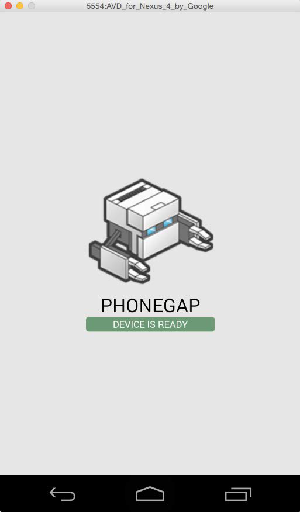
Phonegap rendered  Hello  World

If you Open the root folder of the project in your favorite text editor and open the www/index.html file.
You will HTML code with css and Javascript files called in the html.

One of the javascript file linked to this html controls the changes i.e index.js. There is also the cordova.js file. Every application needs to load the cordova.js file first, if you want to use PhoneGap’s plugin API; as it provides events when it is ready to use them.

Options when creating a new PhoneGap Project

What you saw above is a very simple example of how a phonegap project was created with minimum options. However there are many options and alternatives provided when creating the project in the following format:

phonegap create [options] [id] [name] [config]

Let’s go over the most important parameters, as follows:

• options: There are few available options to fine tune our new project:
°° –name : It specifies the application name.
°° –id : It specifies the package name ID. If this is missing, it defaults to com.phonegap.hello-world. It should follow a similar reverse domain name notation for the package ID.

°° –template : By providing the name of the template, PhoneGap will create a new project from that template.
°° –copy-from : It will create a new project by copying the whole file structure of an existing PhoneGap application that can be modified and edited without changing the original project. This is useful if you have a boilerplate project prepared for your favorite stack of tools that you are using in the project.
°° –src : It does the same thing as the copy-from parameter.
°° –link_to : The link_to parameter links the new project to another project that already has a working code. This is useful if you want to try out new configurations or change the settings in any of the platforms without the worry that you might break something and need to rebuild it from the beginning for a specific platform.
• id: It is just shorthand writing for the options ID setting.

• name: It is just shorthand writing for the options name setting.
• config: It provides you with the ability to pass a JSON string with additional
settings that will be injected into ./.cordova/config.json file.

Here are some examples of how to use the Phonegap project creation command with Options

Task: To create an application with the PhoneGap Essentials name in the essentials directory and the com.phonegap-essentials package ID

phonegap create essentials --name "PhoneGap Essentials" --id "com.phonegap-essentials"

Task: To make a copy of the existing application with a new package ID named com.phonegap-advanced, you can copy the existing application in it.
phonegap create advanced —id "com.phonegap-advanced" —copy-from ./essentials

Managing Platforms when Creating a Project

Creating a new project is pretty much empty and it does not do a lot until you specify which platforms you would like your application to support; thus, we need to add each platform separately. (iOS, Android, Blackberry, Symbian OS etc.)

All the commands to manage the platform have in common the start of the command:
phonegap platform

NOTE: All commands should be run in the root folder of the PhoneGap project to be able to work, except the command to create a new PhoneGap project, which can be run anywhere.
Let’s see a couple of examples:
phonegap platform add ios android – This adds two platforms
phonegap platform list – Lists the platforms

That’s it for now , for creating a new Simple Phonegap application. We’ll talk about this further in our next tutorial which is continuation and about BUILDING and RUNNING THE Application.

You can check out our PhoneGap App development Services from India and find out more if you’re looking to get a Cross Platform app built.


Tagsphonegaptutorial
Previous Article

Amazon’s new surprise move in Augmented Reality ...

Next Article

Phonegap Tutorial 2: Building , Running & ...

Umesh Sethi

Our company helps convert ideas into mobile apps. We work with international clients and clients in Delhi NCR. As the Project Manager i like sharing tips, tricks and suggestions with clients and partners

Related articles More from author

  • How to Manage your Mobile App Development
    Mobile App DevelopmentMobile App ToolsSmall Businesses & Startups

    A Guide on How to Hire & Manage your Mobile App Development Company

    November 19, 2017
    By Umesh Sethi
  • Ionic in Hybrid applications
    Mobile App Development

    Why and When to use Ionic for building your Hybrid mobile app ?

    March 16, 2018
    By Abhay Anand
  • Top 10 Bitcoin Apps for 2018
    Mobile App DevelopmentNew App ReviewsNews

    The Best Bitcoin mobile apps to watch out for in 2018

    December 23, 2017
    By Saurabh Kumar
  • Mobile App DevelopmentMobile App Tools

    Phonegap Tutorial 2: Building , Running & Managing your First Phonegap Application

    March 13, 2018
    By Umesh Sethi
  • Optimising your Play Store Listing, ASO
    Android Tutorials & TipsMobile App DevelopmentMobile App ToolsSmall Businesses & Startups

    How to Optimise your App on Google Play Store, ASO for Play Store Listing ?

    October 30, 2017
    By Saurabh Kumar
  • Software Development, App Development Outsourcing for Atlanta
    Mobile App DevelopmentNewsSmall Businesses & Startups

    Software Development Outsourcing for Atlanta from India – Can it work in 2019 ?

    January 28, 2019
    By Umesh Sethi

Recommended Articles

  • Web Design for Business Owners: What type of website design does your business need ?
    Small Businesses & StartupsWeb

    Tutorial 2: Which type of website does your business need ?

  • Top Android Libraries for 2018
    Android Tutorials & TipsMobile App DevelopmentMobile App Tools

    Top 10 Android Development Libraries | Best Android Libraries for Developers

  • 5 Must have wordpress plugins to use in your website in 2018 and 2019
    Small Businesses & StartupsWeb

    5 Free WordPress must have Plugins for your WordPress site (any type) for 2018 & 2019

  • 21 steps to creating your ecommerce store
    Web

    21 steps to Create a successful e-commerce store ! (Ultimate Guide)

Check our Earlier Posts

  • April 2026
  • March 2026
  • November 2020
  • October 2020
  • September 2020
  • August 2020
  • July 2020
  • June 2020
  • May 2020
  • April 2020
  • March 2020
  • February 2020
  • September 2019
  • March 2019
  • February 2019
  • January 2019
  • December 2018
  • November 2018
  • April 2018
  • March 2018
  • February 2018
  • January 2018
  • December 2017
  • November 2017
  • October 2017
  • September 2017

Our Terms of Use | Partners

Visit blogadda.com to discover Indian blogs
Featured on Blog Directory
Creative Spark Solutions is a web & app development company based in Delhi, India. With this blog we continue to connect with developers, clients and anyone interested in mobile & tech news, happenings & articles.
2017, Creative Spark Solutions helping clients in Web, Mobile & Software