Strategy , Insights, tips on AI first development, App development, Online Marketing

Main Menu

  • Mobile App Development
    • App Tutorials
    • App Reviews
  • Website Guides
  • SMBs & Startups
  • News
  • Guest Posts
  • About
    • Mobile App Development Company Delhi, India
    • Mobile App Development Company Gurgaon
    • Mobile App Development Company Dallas, Florida
    • Website Design Company Delhi
    • WordPress Website Development Company

Strategy , Insights, tips on AI first development, App development, Online Marketing

Header Banner

Strategy , Insights, tips on AI first development, App development, Online Marketing

  • Mobile App Development
    • App Tutorials
    • App Reviews
  • Website Guides
  • SMBs & Startups
  • News
  • Guest Posts
  • About
    • Mobile App Development Company Delhi, India
    • Mobile App Development Company Gurgaon
    • Mobile App Development Company Dallas, Florida
    • Website Design Company Delhi
    • WordPress Website Development Company
  • How to modernize your Legacy Software & Systems using AI & without disrupting business ?

  • How to Select a Mobile App Development Company: 12 Questions Every Client Should Ask

  • How to find a Top Dot net software development company in India

  • 12 proven Checkout Optimization Strategies for Online Retailers in 2026 & beyond

  • 8 Tips & Techniques for Product Discovery Interviews for Product Managers

NewsSmall Businesses & StartupsWeb
Home›News›Why WPBakery disappears with new WordPress 5.0 | How to get back Classic WordPress Editor

Why WPBakery disappears with new WordPress 5.0 | How to get back Classic WordPress Editor

By Umesh Sethi
December 21, 2018
4982
0
We WANT our Classic WordPress Editor back ! Gutenberg Go away ! Come again another day…. a wordpress developer wants to play.

Sounds familiar… Well, it just might.

Today i thought it was going to be just another day. But I was wrong !

Woke up to the smell of coffee and those ‘good intention-ed’ notifications from WordPress declaring they have updated our site to 5.0.2 . So the 5.0 is a major update for WordPress and one of the bells and whistles it has brought to the table is the Gutenberg editor becoming default. Yes, the editor has been there for some time, but now it has become DEFAULT with the wordpress 5.0 update released on December 6, 2018

Don’t get me wrong . The Gutenberg editor for Worpress may well be nice and good. But it’s new and shiny and needs some time getting used to. And for those who liked the clarity and simplicity of the old and ease of switching to a code view… well, nothing like driving your old dependable car.

The second shock I got was when I started work on a wordpress website for a client a few hours later . WP Bakery was installed in the theme and sure enough had been activated nicely.

BUT I just saw the Shiny new ‘Block’ Gutenberg editor on the page I wanted to edit. Clearly something was wrong.

It didn’t take me long to find out. Turns out there had been some notifications regarding the same but for those of us who may have missed it… well basically there seems to be a clash between WPBakery and this new Gutenberg editor which hides and disables the WPBakery option on the edit pages and post screens. Clearly this is temporary and WPBakery may release something compatible even tomorrow.
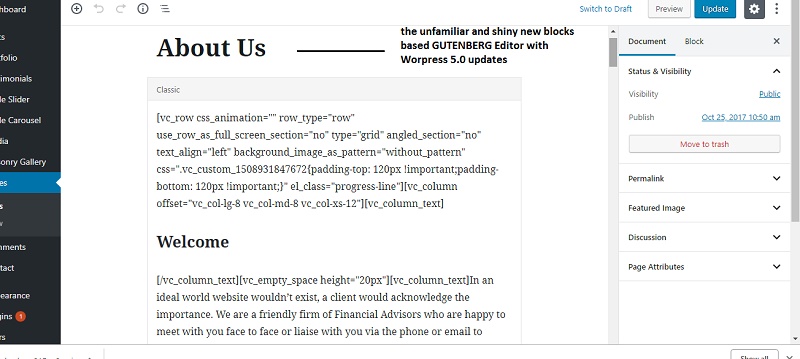
wordpress gutenberg editor hides wpbakery . WordPress 5.0 update

SOLUTION: BUT For those of us who just liked the old classic editor – the issue is quite related. Apparently , you just need to get the old classic Editor enabled and the WPBAKERY plugin will work like before and appear in new page /post creation options. And yes, old wordpress sites which get updated to 5.0 will also face this – apart from new installs.

How do you get the OLD WordPress Editor back after the WordPress 5.0 updates and Re-enable WPBAKERY TO work.

It is quite simple and here are the steps in this short tutorial.

Total time to Implement : Less than 3 minutes.

A) Step 1: Go to Plugins > Add New > (Search for ‘WordPress’s Classic Editor‘ )
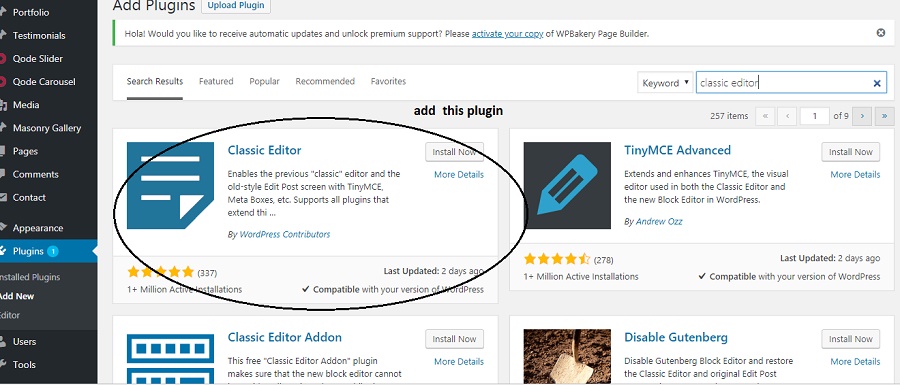
adding  back classic editor wordpress from plugins

How to add back classic Editor from Plugins area

B) Step 2: Install and Activate the Classic Editor (What else :))
Tip: It takes only a few seconds to install the classic editor and you can activate it there and then. No additional settings required.

C) Step 3: Check back re-opening the Edit Post or New post and you will See WPBakery is re-enabled

How i got back my wordpress classic editor  and WPBakery to work

Changes after getting the old editor back

It is not only the WPBakery which may get impacted. Other plugins like Shortcodes Ultimate etc. may stop working abruptly with the new WordPress Gutenberg editor and this changeover may solve those issues as well. However it is best to start getting used to the new editor over the long run.
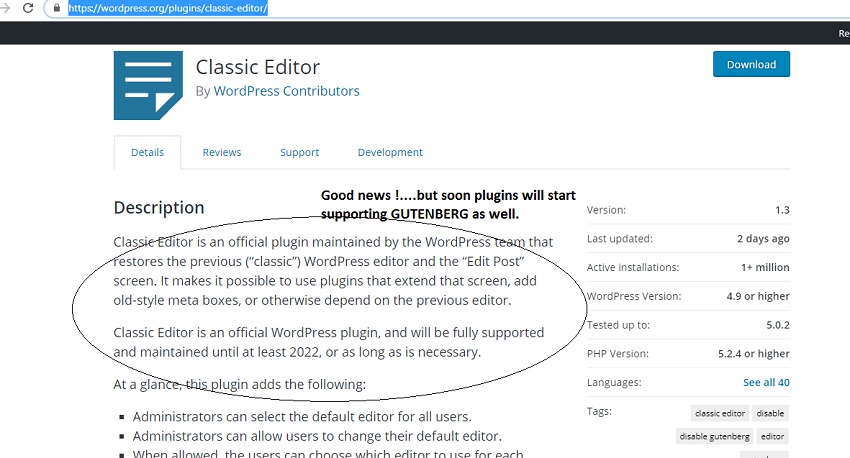
wordpress classic editor - why to use

The classic editor will receive support till 2022 atleast

Alternate solution: There is also the Disable Gutenberg WordPress plugin being touted as another solution to hide the new editor and bring back the old one. But we feel the the Classic Editor plugin is the official recommended plugin to restore the old editor, and has huge no. of installs and official support. Yes this second solution is certainly supposed to be more lightweight but the classic editor install just worked for us and we’re going with it.

After all the name of the technology game is change !!!

PS: Looking for wordpress website development in Delhi or India. Reach out to us at the link above and maybe we can help you.

Summary
Why WPBakery disappears with new Wordpress 5.0 | How to get the Classic Wordpress Editor back ?
Article Name
Why WPBakery disappears with new Wordpress 5.0 | How to get the Classic Wordpress Editor back ?
Description
Don't like the Gutenberg editor ? Want the old Wordpress classic Editor back ? With wordpress 5.0 Gutenberg becomes default but you can get old plugins like WPBakery back and also your classic WP editor. Tutorial tells you how....
Author
Umesh Sethi
Published by
Creative Spark Solutions
Publisher Logo
Creative Spark Solutions
Previous Article

50 Mobile Usage Statistics and Trends for ...

Next Article

Which WordPress Security Plugin in 2019? All ...

Umesh Sethi

Our company helps convert ideas into mobile apps. We work with international clients and clients in Delhi NCR. As the Project Manager i like sharing tips, tricks and suggestions with clients and partners

Related articles More from author

  • What should be included in the requirement list of your Website Design project ?
    Web

    Tutorial 3 – How to Create a Project Plan / To Do List for your Website Design Project

    March 31, 2020
    By Umesh Sethi
  • strategies for cart checkout for online retailers
    Small Businesses & StartupsWeb

    12 proven Checkout Optimization Strategies for Online Retailers in 2026 & beyond

    March 15, 2026
    By Saurabh Kumar
  • Web Design for Business Owners: What type of website design does your business need ?
    Small Businesses & StartupsWeb

    Tutorial 2: Which type of website does your business need ?

    March 11, 2020
    By Saurabh Kumar
  • Software Development, App Development Outsourcing for Atlanta
    Mobile App DevelopmentNewsSmall Businesses & Startups

    Software Development Outsourcing for Atlanta from India – Can it work in 2019 ?

    January 28, 2019
    By Umesh Sethi
  • iPhone 8 specifications, iPhone 8 Actual features
    News

    Does the iPhone 10 or iPhone X meet users expectations? Features, Specifications, Details

    September 12, 2017
    By Saurabh Kumar
  • online marketing dashboard opened
    Small Businesses & StartupsWeb

    10 Tips To Grow Your Online Business

    November 7, 2020
    By Editorial Staff

Recommended Articles

  • featured image web design checklist
    Small Businesses & StartupsWeb

    7 Tasks to Complete before Starting Your Website Development Project

  • Optimising your Play Store Listing, ASO
    Android Tutorials & TipsMobile App DevelopmentMobile App ToolsSmall Businesses & Startups

    How to Optimise your App on Google Play Store, ASO for Play Store Listing ?

  • how to manage magento 2 reindexing from cron jobs
    Small Businesses & StartupsWeb

    How and Why to do Magento Reindexing using CLI and Crontab in Magento 2 ?

  • dot net software development company skills and traits
    Small Businesses & StartupsWeb

    How to find a Top Dot net software development company in India

Check our Earlier Posts

  • April 2026
  • March 2026
  • November 2020
  • October 2020
  • September 2020
  • August 2020
  • July 2020
  • June 2020
  • May 2020
  • April 2020
  • March 2020
  • February 2020
  • September 2019
  • March 2019
  • February 2019
  • January 2019
  • December 2018
  • November 2018
  • April 2018
  • March 2018
  • February 2018
  • January 2018
  • December 2017
  • November 2017
  • October 2017
  • September 2017

Our Terms of Use | Partners

Visit blogadda.com to discover Indian blogs
Featured on Blog Directory
Creative Spark Solutions is a web & app development company based in Delhi, India. With this blog we continue to connect with developers, clients and anyone interested in mobile & tech news, happenings & articles.
2017, Creative Spark Solutions helping clients in Web, Mobile & Software