Where are the Cordova native plugins located ?
Currently, you can get over a thousand different plugins for various functionalities.
These plugins usually support only selected mobile platforms because for the plugins to work on every platform, they have to contain a native code for that specific mobile platform in order to get executed. The majority of the plugins support the iOS and Android mobile platforms and the platforms supported are mentioned next to the plugin.
The most current version of the Cordova Core Plugin APIs are found in their respective GitHub repositories here. You can also find them on the official plugin source directory which is the www.npmjs.com repository.
How to find which are the most popular plugins ?
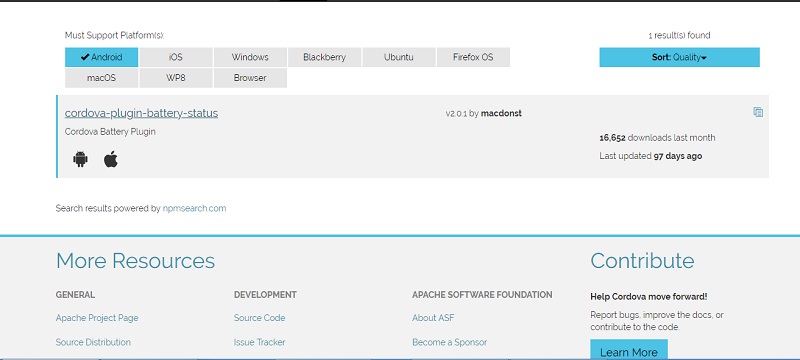
So which are the most popular plugins available to you for your task in Phonegap ? Simply enter the search keywords, sorting it on the basis of number of downloads and you’ll find the popular ones. The NPM directory search allows for search on basis of platform etc. as well.
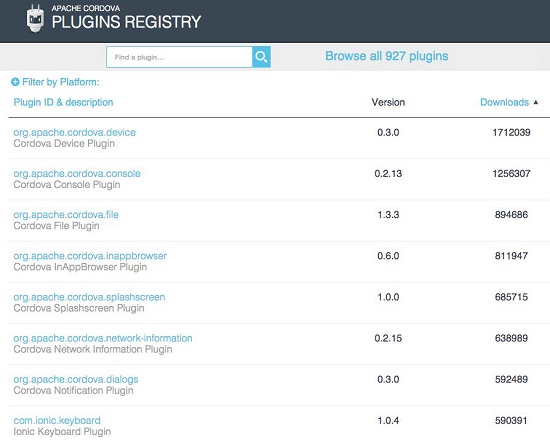
List of some of the most Important Plugins in npm that you’ll find for Phonegap
1. Battery Status
Battery Status plugin allows you to monitor your phone’s battery health and also provide notification. Changes in battery capacity or battery going critically low are provided through this plugin and so can be used to create such notifications or show such status.
• Npm plugin ID: cordova-plugin-battery-status
2. Camera
The Camera Plugin is able to access a native controller to take photographs with the device’s camera. It provides the default photograph taking interface although other plugins are available for this as well now. Beside photograph you get access to select photographs from gallery or library within the phone.
• Npm plugin ID: cordova-plugin-camera
3. Contacts
The contacts plugin provides you access to the native contacts component. You can retrieve contact information from the database, insert new contacts or update contacts. Some features are dependent on the targeted mobile platform.
• Npm plugin ID: cordova-plugin-contacts
4. Device
The device plugin enables you to access specific device information. It gives you information about the current PhoneGap version, device’s model, device’s platform, device’s UUID (which represents the unique device ID), and the device’s version. This kind of information is useful for the various parts of the code where you need to check for the existence of supported features based on the mobile platform.
• Npm plugin ID: cordova-plugin-device
5. The Device Motion plugin
The Device Motion plugin uses your device’s internal sensor to measure the acceleration of the device. It emits events for acceleration changes or you can read the current values. It can track the accelerations in the x, y, and z axes at specific intervals. This is especially useful in gaming applications.
• Npm plugin ID: cordova-plugin-device-motion
6. Dialogs
The Dialogs plugin provides you a facility to present native dialog components to the user. When you need to give the user an alert dialog box with an additional message or description, this plugin presents the user with a dialog box to confirm the action before continuing it. Most of the platforms do use native dialogs because they are better in look and performance.
• Npm plugin ID: cordova-plugin-dialogs
7. File Transfer
The File Transfer plugin integrates the upload and download of files directly from the Internet. This is done using HTTP POST request. It also allows you to monitor the progress of the process during the upload or download, which you can abort altogether.
• Npm plugin ID: cordova-plugin-file-transfer
8. Geolocation
The Geolocation plugin has the ability to locate the current user’s location with the help of an integrated GPS sensor. It provides a location with its latitude and longitude. This is quite important as many applications rely on Geolocation. This plugin also allows you to track a device (which has granted permissions), like in native android using fused location or android location API.
• Npm plugin ID: cordova-plugin-geolocation
9. Globalization
The Globalization plugin gathers information and performs operations specific to the user’s locale, language, currency, and time zone. There is difference between locale and language: locale provides information about how to present and parse the local dates and other information while language is used to present the content in that
language. This makes it a very important plugin for any developer when developing global apps.
• Npm plugin ID: cordova-plugin-globalization
10. InAppBrowser
The InAppBrowser plugin provides you with another browser in which you can open a web page directly from the application. This browser window cannot access any PhoneGap-specific API. So, this is useful only when you want to load third-party content. The in-app browser lets the user open any link within the app’s browser instead of system’s browser. This plugin is especially useful when you are opening any third-party un-trusted content instead of Cordova webview.
• Npm plugin ID: cordova-plugin-inappbrowser
11. Media Capture
The Media Capture plugin provides access to the various media input elements that the device possesses such as audio, image, and video capabilities. Every capability has a custom native application view in which you can record different media. So one can access all types of media, which is a critical functionality required in many applications.
• Npm plugin ID: cordova-plugin-media-capture
12. Media
The Media plugin provides you with the ability to record and play back audio files on a device. With this plugin, you can play internal or external audio files provided with the URL address as well. It provides almost full audio playback, as the native applications do; so you can play music in the background while using another application.
• Npm plugin ID: cordova-plugin-media
13. Network Information
The Network Information plugin provides you with the information that almost every application will need if it depends on the Internet connection. This plugin gives you the ability to check what kind of connection is currently available or if there is no connection at the moment. It also has events that can be triggered when the device goes into offline or online mode. Most apps today prompt or inform you if the network is down, if they are dependent on internet, which is why this plugin is so important.
• Npm plugin ID: cordova-plugin-network-information
14. Splashscreen
The Splashscreen plugin has a single feature and that is to show the splash screen image on loading and hide it when the app is already loaded. The splash screen is visible during the process of loading the data from the Internet connection and once it is downloaded, it can be hidden.
• Npm plugin ID: cordova-plugin-splashscreen
15. Vibration
The Vibration plugin provides you with the capability of activating the internal device’s vibrating feedback, which gives a silent reminder when it is needed. It can activate a simple vibration reminder or give a pattern of vibrations. You need to check out the platform compatibility before downloading this plugin.
Npm plugin ID: cordova-plugin-vibration
If you are looking for Cross platform Mobile app Development out of India or an E-commerce Development Company based in Delhi, do contact us.